> ## Documentation Index
> Fetch the complete documentation index at: https://docs.same.new/llms.txt
> Use this file to discover all available pages before exploring further.
# Common Issues
> Common issues you may run into on Same and how to resolve them.
## Overview
You may occasionally run into one of the issues below. Here’s how to resolve each one.
## Errors in chat
### Please try again: prompt is too long
An error that looks like this:
> Please try again
>
> prompt is too long: 207371 tokens > 200000 maximum
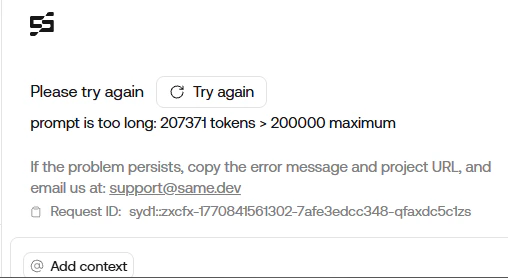 This error can happen if your chat becomes too large while using models from Anthropic, such as `claude-4.5-sonnet` or `claude-4.5-opus`.
**To resolve:** Create a new chat.
This error can happen if your chat becomes too large while using models from Anthropic, such as `claude-4.5-sonnet` or `claude-4.5-opus`.
**To resolve:** Create a new chat.
 ### Endless generation
Sometimes Same may **keep generating** without finishing (the response never settles).
**To resolve:**
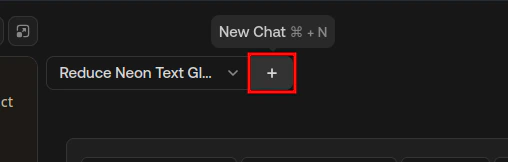
1. **Start a new chat** using the "New Chat" button ( icon, top-left in the chat panel).
2. **Before you send your message,** remove attachments you do not need. You can **keep the chat reference** attachment so Same still has context from the earlier conversation.
### Endless generation
Sometimes Same may **keep generating** without finishing (the response never settles).
**To resolve:**
1. **Start a new chat** using the "New Chat" button ( icon, top-left in the chat panel).
2. **Before you send your message,** remove attachments you do not need. You can **keep the chat reference** attachment so Same still has context from the earlier conversation.
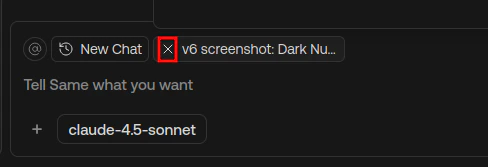 3. If endless generation **continues**, **remove every attachment** (including the chat reference) and try again.
***
For troubleshooting prompts and debugging issues with your website, see [Troubleshooting](/essentials/troubleshooting).
3. If endless generation **continues**, **remove every attachment** (including the chat reference) and try again.
***
For troubleshooting prompts and debugging issues with your website, see [Troubleshooting](/essentials/troubleshooting).